



Why Your AI Agent Writes Appium Tests That Don't Run
Short answer: you asked your agent for a checkout test, it wrote 60 lines of Appium in ten seconds, and the run died on line 4 at an id that is not in your build. That is not a prompting problem — the agent has never seen your app. Give it the real element tree, the real network traffic and the real run result, over one connection to real hardware, and it stops guessing.
Where the hours actually go
Nobody spends an afternoon typing a test. The sketch of a login-and-checkout flow takes ten minutes.
Then the id you guessed is not in the build. The wait is on the wrong thing. A permission dialog nobody mentioned eats the first tap. The API returns the empty state because the account has no orders. Each of those is a full round trip — run it on a device, read the failure, adjust, run it again — and each round trip is five to ten minutes. Twenty of them is the day.
Hand the job to an AI agent and the loop does not change. The agent is faster at typing, so it reaches the loop sooner. It still writes a locator it has not seen, still runs, still fails, still waits for you to paste the stack trace back. Better prompting does not help, because the problem is not phrasing. The agent is reasoning about an application it has never looked at.
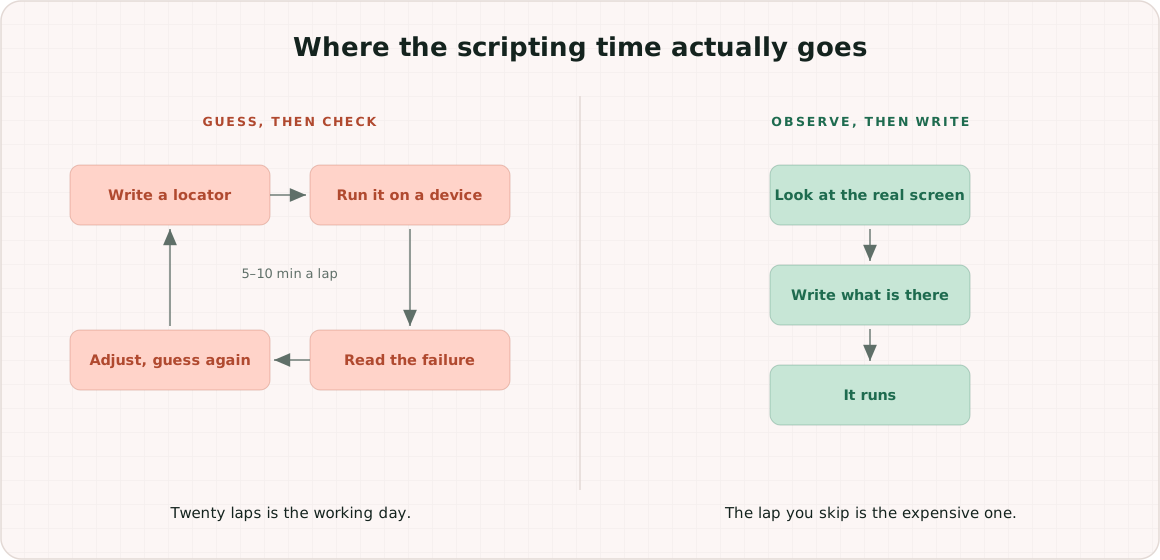
An agent needs the screen, not a description of the screen
Write down what a person does before choosing a locator. Open the screen. Inspect it. Read the identifiers that are actually there. Tap something. Look at what changed.
Every one of those is an observation, and none of them survives being summarised into a prompt. So the tools we built are the same four things, pointed at real hardware:
- the element tree of what is on the screen right now, with named, addressable elements
- what happened after an action — a screenshot, the new tree, the logs
- the traffic the app produced while doing it
- the result of the run, afterwards
An agent holding those writes the locator that exists instead of the one that sounds right.
Real elements, not forty nested wrappers
React Native on iOS is the sharpest version of this. Point a common inspector at an RN screen and you get a stack of nested wrappers, none of which is obviously the button — so the agent falls back to an XPath describing where the element sat that day, and the test breaks on the next layout change.
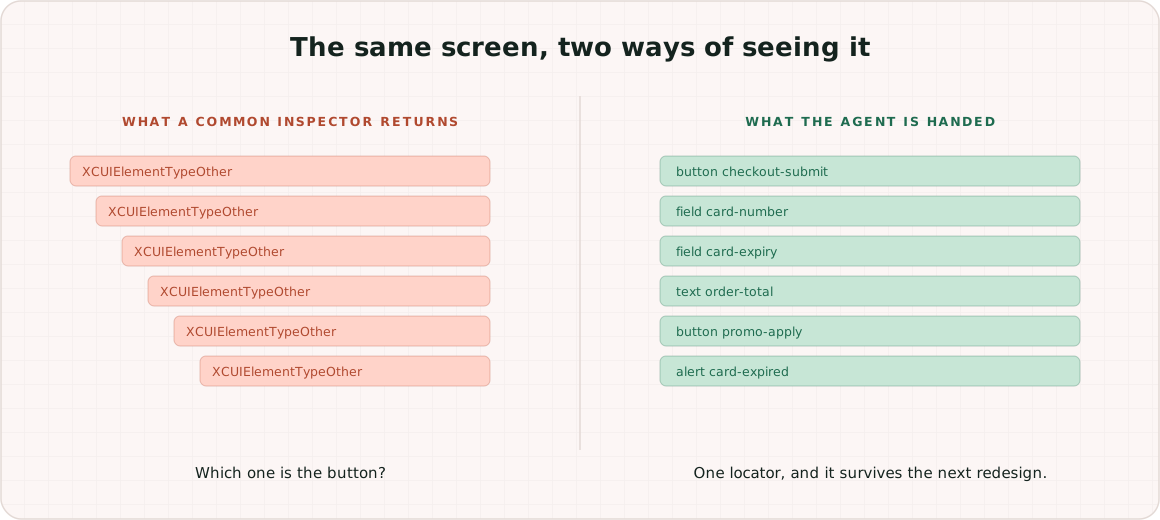
In our inspection, a React Native app shows up the way any native app does: named elements the agent can address directly, on iOS as well as Android. One locator then drives both platforms instead of two. There is a longer piece on that if it is the problem you came here with.
The two platforms stop being two problems
The asymmetry between iOS and Android is where automation work quietly goes to die: different inspection, different waits, different file handling, different everything, so half your suite is platform-specific code that does the same thing twice.
An agent calls the same tool names on both. Element waits, region queries, locator suggestions, files on and off the device, gestures of any shape, device logs. Set the device language, or launch one app in another language and leave the rest of the phone alone — without walking into Settings on either platform. Where the two operating systems genuinely differ, the difference is absorbed on our side rather than turning up in your agent's context window as a special case.
One thing worth stating plainly rather than glossing: iOS automation needs a Mac somewhere. It is ours, not yours, but the requirement exists.
What the agent can actually reach
All of the below runs over the same connection, on both platforms:
- Drive the device the way a person does — native finger-like taps, multi-touch gestures, freeform gesture paths of any shape, real key presses, and a game controller if the app takes one.
- Change the device out from under the app — device language or one app's language, light and dark theme, GPS location, orientation — without walking into Settings to do it.
- See what the app is doing — element trees with locator suggestions, accessibility information, live device logs, crash reports and performance counters.
- Inspect, restyle and intercept web content — DOM, CSS, console, network interception and response mocking, over the Chrome DevTools Protocol on Android and on iOS Safari alike.
- Capture and mock the network — web and native traffic alike, which is the next section.
- Run the suites you already have — Selenium, Appium, Playwright and WebdriverIO, against these same devices and against real desktop browsers on the grid.
The list matters less than the property it has: an agent does not have to leave, and it does not have to ask you to go and do the step it cannot reach.
That property is also where this goes past what a WebDriver session gives you. Appium is the right tool for driving an app and your suites keep using it — nothing here replaces that. But a WebDriver session is scoped to driving: in one session it will not also hand you the device's native network traffic, a symbolicated crash grouped with its siblings, a game controller, an accessibility audit, or the CSS of a page inside a webview. Those are normally four tools and a folder of glue scripts. Here they are one connection, which is the reason an agent can hold the whole picture at once instead of being handed a slice of it.
The browser on the device, not a stand-in for it
Mobile web bugs live in the mobile browser. A desktop Chrome window at 390px wide is a layout preview, not the thing your users hit.
So the agent gets the same class of control over the browser on the device that Playwright gives it over a desktop one. Navigate, evaluate JavaScript in the page, read and query the DOM. Change CSS and watch the layout respond. Read and set cookies, stream console output, intercept the network, mock a response. Android Chrome and iOS Safari alike, over the standard Chrome DevTools Protocol on both.
iOS is the half that usually comes with an asterisk, and here it does not. Interception and response mocking are there alongside inspection, so your agent gets the same shape of control it would have driving Playwright — and it writes against one protocol rather than two.
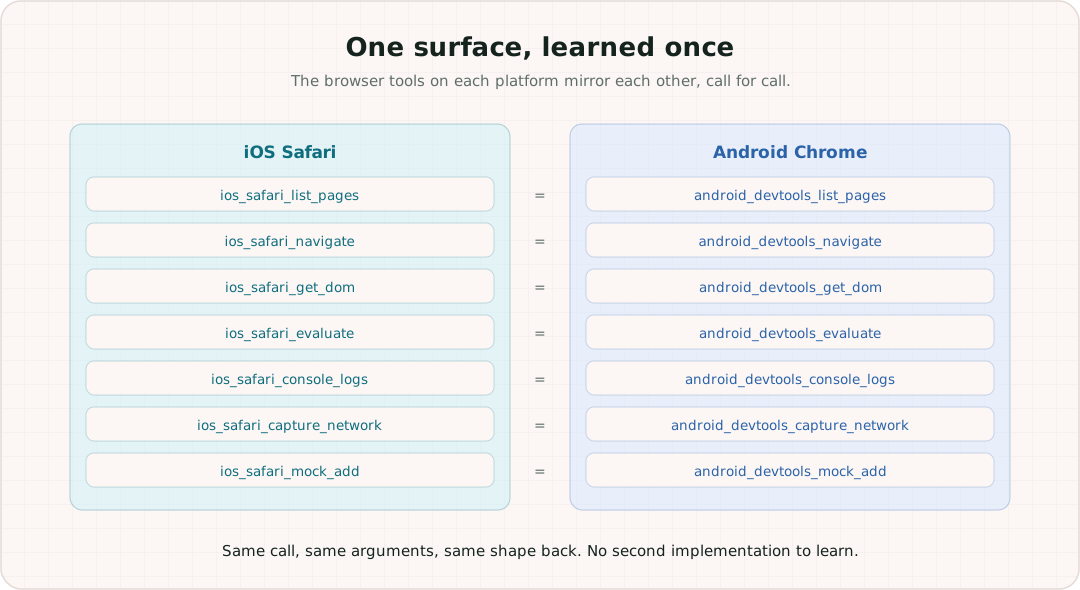
The practical effect is that "reproduce it in the real mobile browser" stops being a separate project. It is the same connection, one tool call away from the native side of the same app.
Real desktop browsers on the grid are there too, driven by Selenium, Playwright or WebdriverIO, so one suite can cover both without changing where it runs.
Real data, not a plausible imitation of it
The screen is half the picture. The other half is what the app is actually saying over the network, and that includes the native traffic — not just what a browser tab is doing. Capture works for web and native content, on both platforms.
That matters for scripting speed because the agent can see the request that produced the empty state, and then mock the response to make that state happen on demand. An intermittent bug you could not reproduce becomes a test with a fixed input. The guess-and-check loop is replaced by a thing you can assert on.
Then it reads its own homework
The Selenium and Appium runs executed on the grid are readable by the agent too. Not just pass/fail: what the suite did, which step failed, what it touched, and a diagnosis of why. The agent that wrote the test can look at the run and fix it, without a person carrying a stack trace from one window into another.
That is the part that compounds. The loop still exists — it always will — but it closes without you standing in the middle of it.
One scenario, three ways
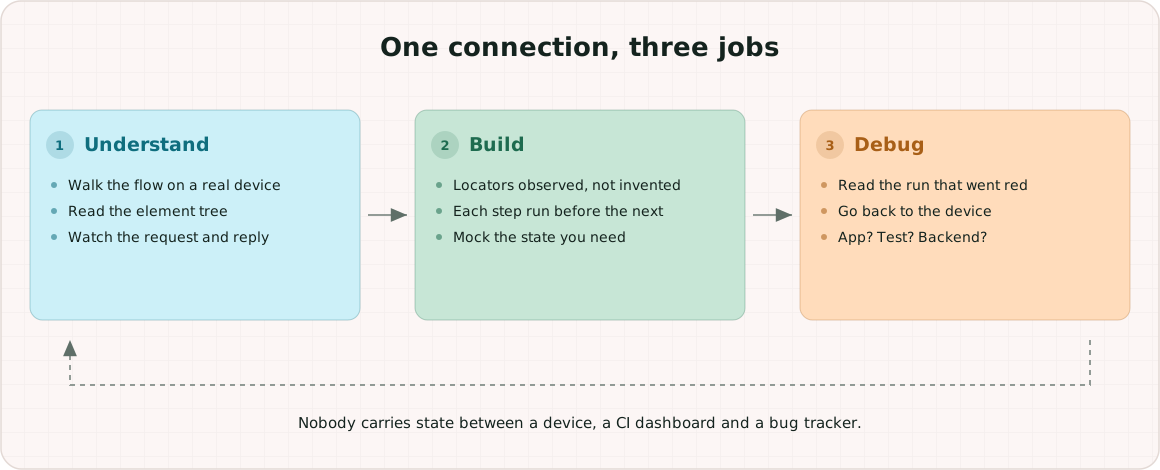
Take a real ticket: checkout fails for customers whose saved card has expired, but only on mobile. Here is the same connection doing three different jobs.
Understanding it. The agent installs the build on a real phone and walks the flow itself. It does not ask you to describe the screens — it reads the element tree at each step and gets named, addressable elements back, on iOS as well as Android. Where checkout is web, it drives the device's own browser: evaluate a bit of JavaScript, read the DOM, pull the console, watch the request go out and the response come back. Within a few minutes it can tell you which step rejects the card and what the server actually replied, rather than what the ticket says it replied.
Building the automation. Now the locators are observed instead of invented. The agent writes the test and runs each step on the device as it goes, so a step is confirmed before the next one is written. When it needs the expired-card state on demand, it mocks that response rather than waiting on a test account to age into the right condition — and the same trick covers the empty state, the timeout and the 500 that your backend will not produce to order. What lands in the repository has already run green once.
Debugging it. Six weeks later the test goes red in CI. The agent reads the run off the grid — which step, which element, the screenshot at the point of failure — and then goes back to the device to check the live behaviour: capture the traffic, read the device log, look at the element tree as it is now. That is what separates the app changed, the test was brittle and the backend actually broke. Those three have different fixes, and picking the wrong one costs a day.
None of those three jobs is new. What changes is that all three happen without a person carrying state between a device, a browser, a CI dashboard and a bug tracker.
Concretely, the calls behind that walkthrough:
# understand it
device_launch_app_in_language      open the build in the locale under test
device_page_source                 the element tree as it is right now
device_locators_for                what to address this element by
ios_safari_get_dom                 the web checkout, on the device's own browser
ios_safari_console_logs            what the page complained about
ios_traffic_start / _flows         the request that rejected the card

# build it
device_find_element                locators that were observed, not invented
device_wait_for_element            a wait on state instead of on sleep()
device_tap / device_type           drive it and confirm each step lands
ios_safari_mock_add                force the expired-card response on demand

# debug it
automation_sessions_list           find the run that went red
automation_session_step            which step, which element, the screenshot
automation_report                  the diagnosis
ios_accessibility_audit            labels and reading order, if it is a11y
jira_create_issue                  file it with the evidence attached
Read down the iOS column and swap the prefix: android_devtools_get_dom,
android_devtools_console_logs, android_traffic_start, android_accessibility_audit. The two
families mirror each other deliberately, which is what "no second implementation" means in practice
— your agent learns the surface once.
All of it through one connection
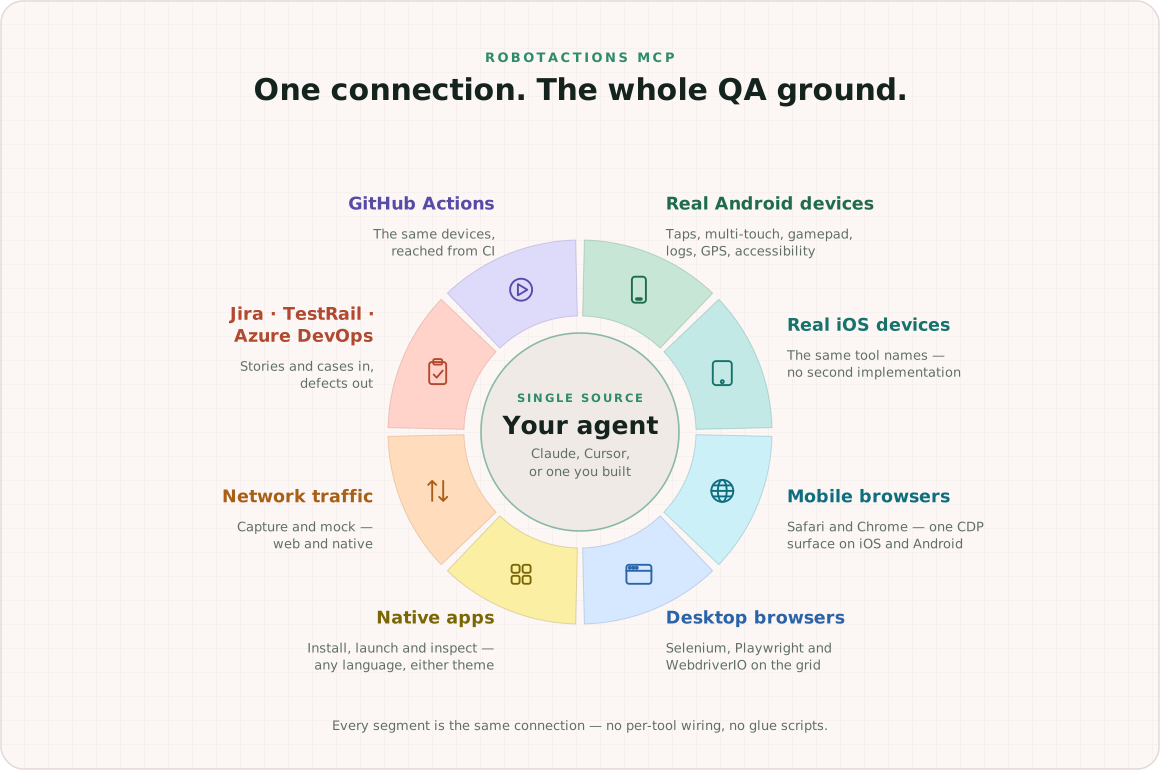
Real devices, real mobile and desktop browsers, the app installed on them, the traffic they produce, and the tools the rest of the team already lives in. Coverage of the test-management stack is complete rather than token: the agent reads stories and acceptance criteria, pulls and updates cases, and files defects in Jira, TestRail and Azure DevOps. The same devices are reachable from CI through a published GitHub Action.
Story, to test, to run, to diagnosis, to defect — with nobody relaying results between four browser tabs. One endpoint, one authentication, no per-tool glue script to maintain.
What we are actually after
Not "AI writes your tests for you". That framing sells a shortcut, and shortcuts are why so much generated test code gets deleted in review.
The goal is narrower and more useful. An agent should be able to use a real device as freely as a person can: pick it up, try something, look at what happened, try the next thing. Change the language and see what breaks. Force the error state and watch the screen. Read the log when something looks wrong.
Understanding comes out of that freedom, and it is the understanding that matters. Automation written by something that has actually operated your app is stronger than automation written by something that was told about it — the locators are real, the waits are on states that exist, and the edge cases are ones it watched happen rather than ones it imagined.
That is the whole design brief. Give the agent the device, honestly and completely, and the good test scripts are a consequence rather than a trick.
Try it on something end to end
npx @robotactions/mcp@latest initThe free tier is one device and ten minutes of device time a day, which is enough to find out whether this argument holds. Give your agent a flow you have been meaning to automate and watch where it stops guessing.
Related
Ready to test on real devices?
Sign in with Google or GitHub and get real iOS and Android devices in your browser — free to try.